
RBKM - Multirotor
Propulsion, Telemetry and Failsafe Checks
Connect propellers, motors, ESCs, telemetry warnings and failsafe settings into practical pre-flight and in-flight decisions.
Lesson references
- Last reviewed
- 2026-05-19
- Lesson references
- RePL Study Guide pp. 166-183; Part 101 MOS C10 pp. 111-113; CASA AC 101-03 v2.0 Appendix C checked 2026-05-19.
Propulsion is a chain, not a single component
A multirotor produces lift through a connected chain: battery, power distribution, ESCs, motors, propellers, flight controller commands and the aircraft structure holding everything in alignment.
A problem anywhere in that chain can look like poor climb, vibration, unexpected yaw, unstable hover, unusual noise, motor warning, hot components or a sudden loss of control margin.
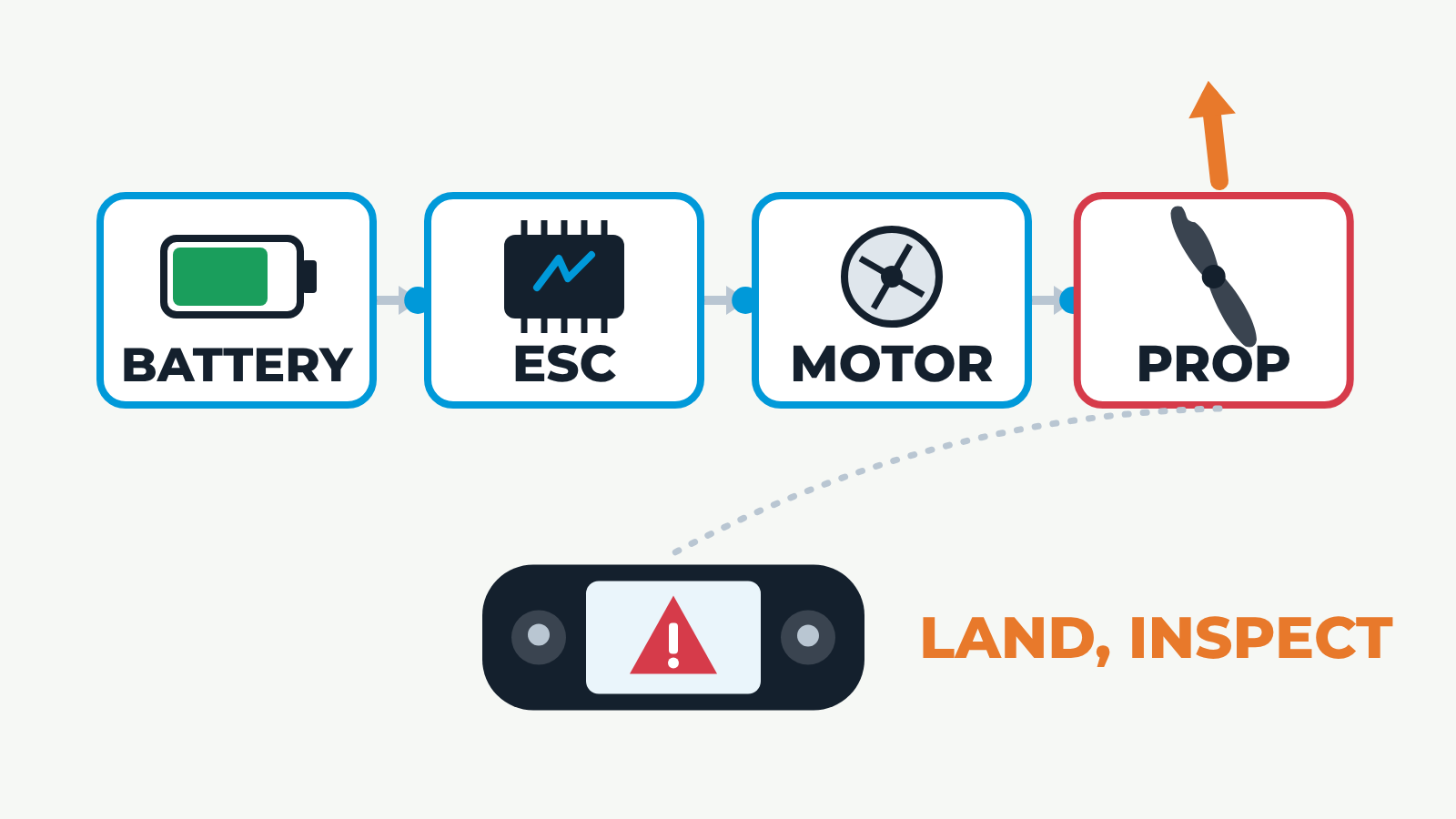
An 11 second loop. Four links of the propulsion chain appear in a row: battery, ESC, motor and propeller. Energy pulses flow along the chain and a thrust arrow rises from the propeller. Then one fault is introduced. A damaged propeller vibrates and gives a wobbling, reduced thrust arrow; a hot motor shows heat waves; a sagging battery drains and weakens everything downstream. A telemetry pulse runs from the faulty link to the remote pilot's controller screen, which shows a warning symbol, and the decision Land, inspect appears. With no fault selected the controller shows a green tick and thrust stays steady. The still frame shows the damaged-propeller case after the warning.
Propellers are small aerofoils under high load
Propellers create thrust by accelerating air. Their condition matters: chips, cracks, deformation, incorrect fitment, wrong rotation, loose hubs or contamination can create vibration and reduce thrust.
The propeller check is not cosmetic. A damaged or incorrectly installed propeller can overload motors and ESCs, confuse sensors through vibration and leave the aircraft with too little control margin when it matters.
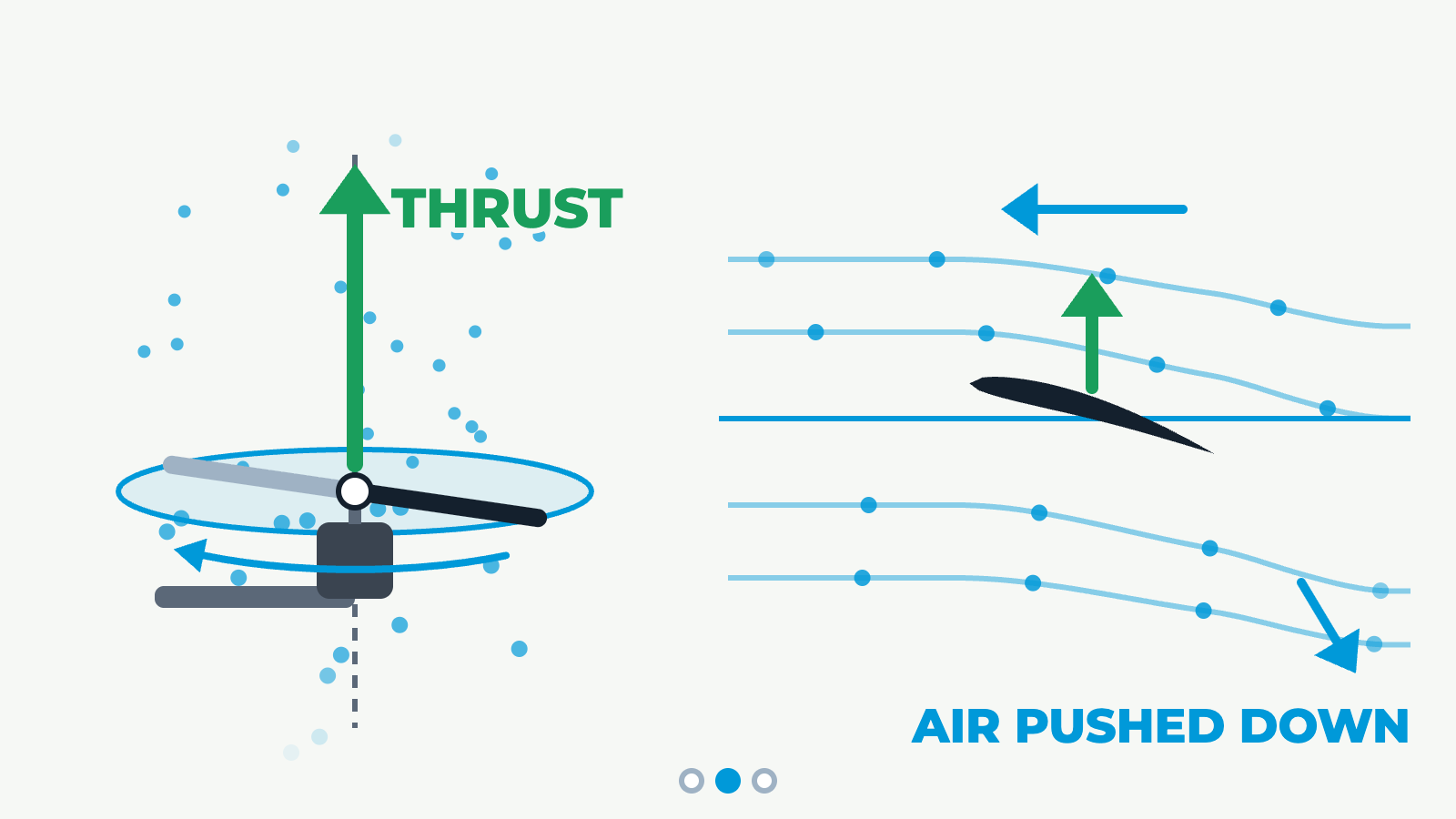
Three steps of about four and a half seconds each. Step 1, blade section: a two-blade propeller spins on a motor, and its disc is the plane of rotation. A cross-section of one blade is an aerofoil. Its chord line is tilted from the plane of rotation by the blade angle, leading edge first, as the blade moves through the air. Step 2, thrust: the blade turns the air downward, air is drawn into the disc and pushed down below it, and thrust acts upward along the shaft, at right angles to the plane of rotation. Step 3, torque, viewed from above: a quadcopter's diagonal pairs spin in opposite directions, front-left and rear-right clockwise (CW), front-right and rear-left counter-clockwise (CCW). The CW pair pushes the body counter-clockwise and the CCW pair pushes it clockwise. The reactions are equal and opposite, so the torques cancel and the aircraft does not yaw. The still frame shows step 2.
Motors and ESCs turn battery energy into control authority
The ESC controls motor speed in response to the flight controller. The motor and propeller then produce the thrust needed for lift, attitude control and recovery.
High current, poor cooling, damaged cables, loose connectors, worn bearings, contamination, water ingress or overheating can reduce reliability. CASA's model-aircraft guidance also notes that current flows in battery-controller-motor setups can be extremely high and that cables and connectors need to be in good order.
- Check motor security, free rotation, abnormal noise and heat.
- Check ESC warnings, wiring, connectors and signs of overheating.
- Do not ignore vibration, repeated motor errors or unexplained yaw.
Telemetry warnings are early decision points
Telemetry gives the remote pilot battery state, link quality, GPS health, mode state, height, distance, warnings and aircraft behaviour cues. It is only useful if the pilot notices it early and responds conservatively.
A warning is not a suggestion to press on until the job is finished. Battery sag, weak link, compass disagreement, motor load, excessive wind or GPS health warnings should push the crew toward simpler tasks, better link geometry or recovery.
Return-to-home is not a magic button
Return-to-home depends on aircraft configuration, home point accuracy, GNSS quality, height setting, obstacle environment, wind, battery state and command-link logic. If any of those assumptions are wrong, the automated recovery may create a new problem.
Before launch, the crew should confirm what the aircraft will do for loss of command link, low battery, critical battery, GNSS degradation, geofence boundary and manual RTH activation.
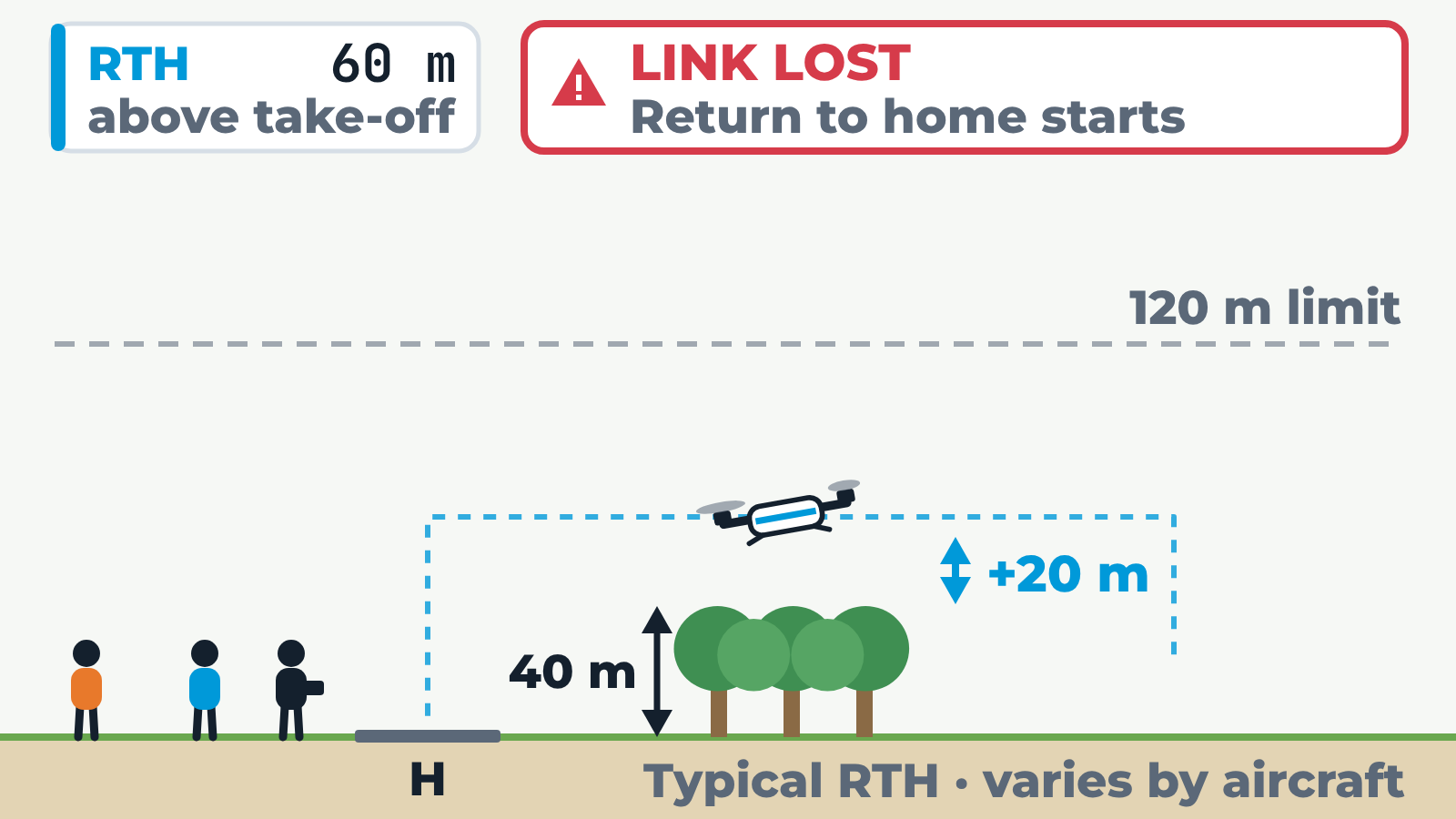
Side view of a site. The home pad and the pilot are on the left, a few people stand further left, and a 40 m tree line stands between the pad and a work area on the right. A dashed line marks the normal 120 m height limit. The drone is working low beyond the trees when the command link is lost, and return to home (RTH) starts: the aircraft climbs to the set RTH height, flies straight back to its recorded home point and lands. Heights are above take-off. With RTH set to 60 m, the RePL Guide example (highest obstacle 40 m plus at least 20 m), it clears the trees by 20 m and lands on the pad. At 30 m it flies into the trees. At 150 m it climbs above the 120 m limit. If the home point was not updated and is still recorded among the people, the aircraft flies back and lands among them. This is a typical RTH sequence; the actual behaviour varies by aircraft and settings. Not to scale.
Failsafe choices must match the site
Hover, land, return-to-home, hold, terminate and parachute options have different consequences. The best option depends on people, obstacles, water, roads, controlled airspace, wind, terrain, structures and the aircraft's actual position.
A suitable failsafe in an open paddock may be unsuitable beside a road, under a bridge, near a crowd or inside a constrained industrial site.
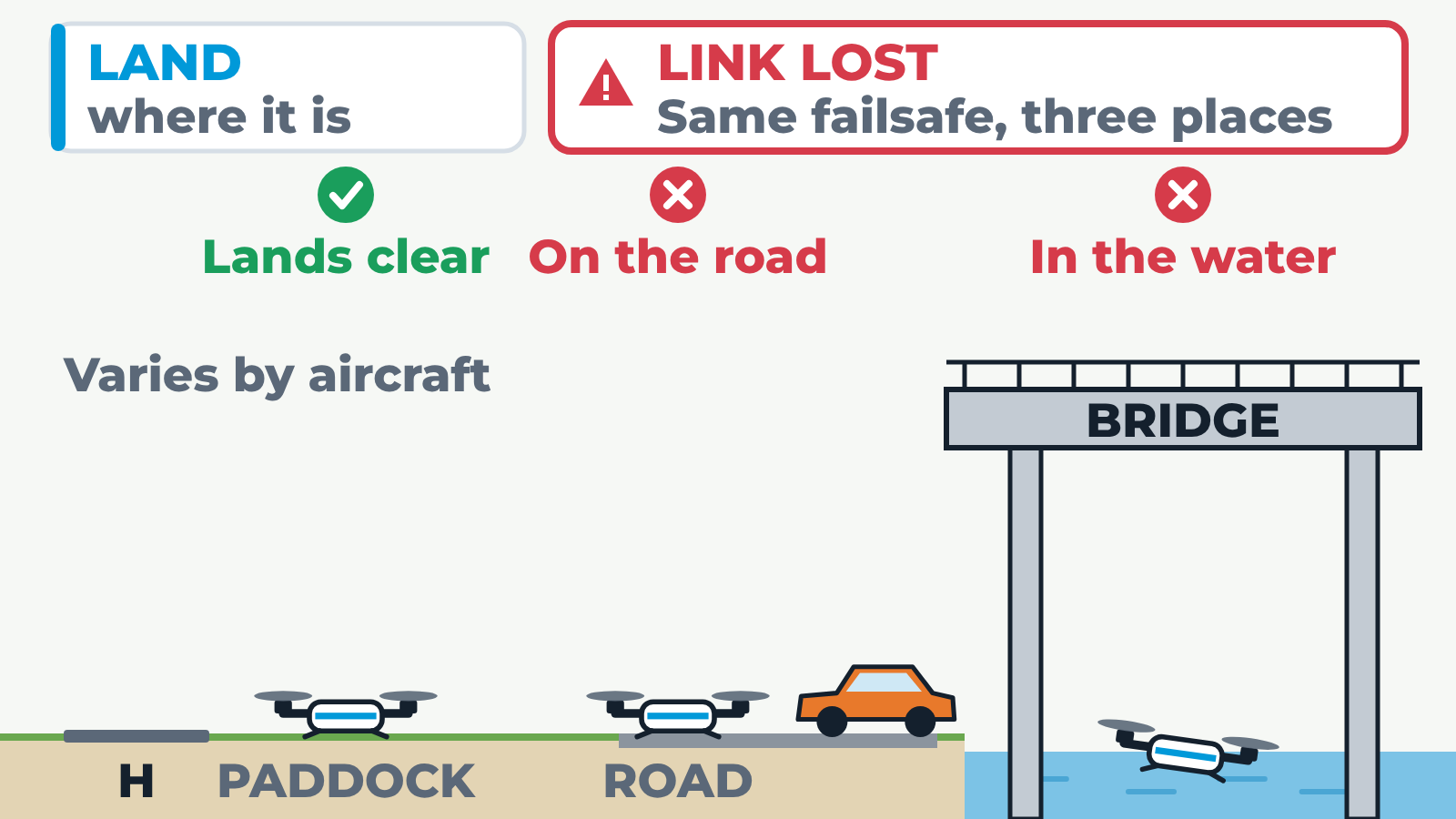
Side view of one site with three drones at three positions: over an open paddock, over a road, and under a bridge above a river. The home pad is on the left. The command link is lost and all three run the same failsafe, chosen with the Failsafe buttons. Land: the paddock drone lands clear, the road drone lands on the road and the bridge drone lands in the water. Return to home: the drones climb to the return height and fly home; the paddock and road drones get home, but the bridge drone climbs into the bridge deck. Hover: all three hold position and wait until the battery runs low; under the bridge the aircraft may drift. Parachute: the motors stop and each aircraft comes down under a canopy where it is: clear in the paddock, on the road, and in the water. The same failsafe can suit one position and be dangerous at another. Outcomes are illustrative; real behaviour varies by aircraft and settings.
- Check home point and RTH height before take-off.
- Confirm geofence and maximum-distance settings match the job.
- Brief what the crew will do if automation behaves differently from expectation.
Pre-flight checks should include a controlled behaviour check
A safe launch is not complete when the aircraft leaves the ground. A brief controlled hover and response check can reveal vibration, drift, poor position hold, sensor disagreement, abnormal noise or unexpected control response before the aircraft moves away.
If the aircraft does not feel or look right, land and inspect. The cheapest time to solve a propulsion or telemetry problem is while the aircraft is still close and controllable.
Practice Questions
Why is a damaged propeller more than a cosmetic issue?
- It can create vibration, reduce thrust and stress motors or ESCs.
- It only changes the aircraft colour.
- It improves telemetry quality.
- It makes GNSS more accurate.
Answer: It can create vibration, reduce thrust and stress motors or ESCs.
Propeller damage can affect lift, vibration, component load and aircraft controllability.
What should repeated telemetry warnings usually trigger?
- A conservative decision such as recovery, investigation or simplifying the task.
- Continuing farther from the recovery area.
- Turning off all warnings.
- Assuming the warning is always false.
Answer: A conservative decision such as recovery, investigation or simplifying the task.
Telemetry warnings are early signals that the aircraft may be losing operating margin.
Why must return-to-home settings be checked before launch?
- RTH depends on home point, height, GNSS, battery, wind and obstacle assumptions.
- RTH always works perfectly in every site.
- RTH replaces the need for a landing area.
- RTH makes propeller checks unnecessary.
Answer: RTH depends on home point, height, GNSS, battery, wind and obstacle assumptions.
Automated recovery is only safe if the assumptions behind it suit the site and aircraft state.
What is the value of a controlled hover check after take-off?
- It can reveal abnormal vibration, drift, noise or control response while the aircraft is still close.
- It replaces all pre-flight inspection.
- It proves the battery can never fail.
- It removes the need to monitor telemetry.
Answer: It can reveal abnormal vibration, drift, noise or control response while the aircraft is still close.
Post-launch checks catch problems while recovery is still simple.
Next step after study
Complete your Remote Pilot Licence training
The free study guide is a strong theory foundation. To actually be issued with a RePL, students still complete approved training, practical flying and assessment with a certified provider.