
RACP - Airspace and Charts
ERSA, NOTAMs, PRD Areas and Publication Checks
Turn charts, ERSA, NOTAMs, PRD areas and drone safety apps into a traceable pre-flight decision.
Lesson references
- Last reviewed
- 2026-05-18
- Lesson references
- RePL Study Guide pp. 83-98; Part 101 MOS C10 pp. 94-95; Airservices AIP/ERSA/NOTAM sources checked 2026-05-18.
Charts show structure; ERSA gives aerodrome facts
A chart can show that an aerodrome, control zone, restricted area or frequency boundary exists. ERSA gives the deeper aerodrome information a pilot may need to interpret that picture, such as runway data, aerodrome remarks, communication frequencies, lighting, procedures and cautions where published.
A remote pilot does not need to use ERSA like an airline crew briefing package. They do need to know when an aerodrome detail could affect the RPA operation: runway direction, circuit activity, CTAF, approach/departure paths, emergency options, hazards and operating hours.
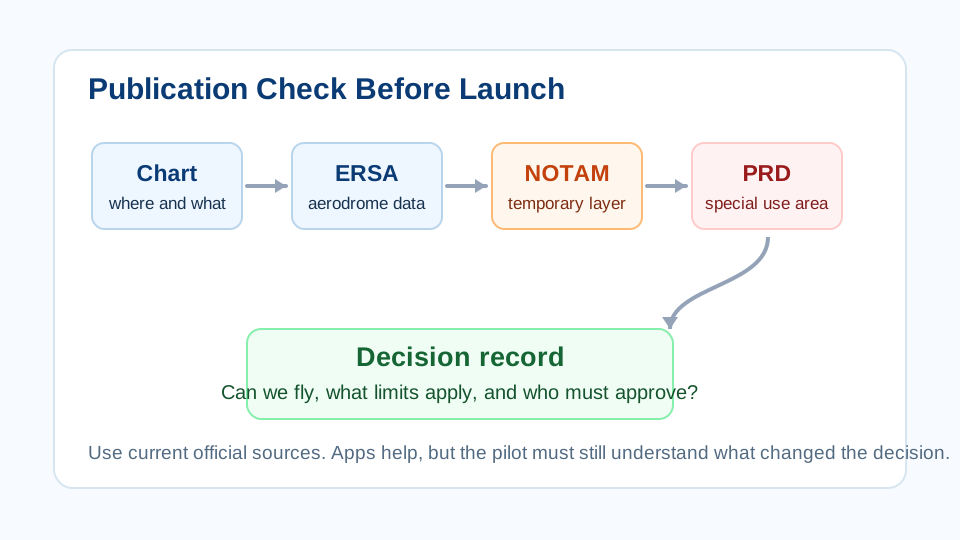
NOTAMs are the temporary layer
NOTAMs communicate temporary aeronautical information. For an RPA operation, a NOTAM may indicate temporary restricted airspace, an activated danger area, aerodrome works, runway or lighting changes, frequency changes, emergency activity, special events or other hazards.
The important habit is date and location discipline. A NOTAM that mattered yesterday may not matter today, and a NOTAM at the wrong aerodrome is just noise. Check the current pre-flight information for the time, location, altitude and route of the planned job.
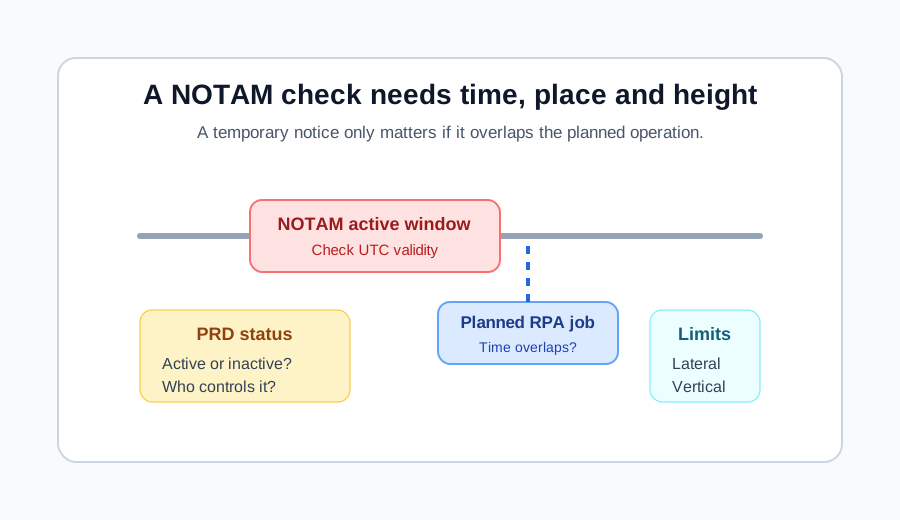
- Check NOTAMs close enough to flight time to catch temporary changes.
- Read validity times, affected area and altitude limits carefully.
- Record only the NOTAMs that affect the decision or operating limits.
PRD areas are not chart decoration
Prohibited, restricted and danger areas exist because particular activity or risk may be present. Military activity, weapons ranges, special events, emergency operations and other hazards can all appear through special-use airspace.
A restricted area may be active or inactive depending on published times, NOTAMs or controlling authority information. A danger area is not automatically forbidden, but it tells the pilot there may be activity that makes the airspace unsuitable without further assessment.
- Identify the PRD designator and vertical limits.
- Check whether the area is active for the planned time.
- Check whether approval, clearance, coordination or avoidance is required.
- If the status is unclear, do not guess.
Drone safety apps are aids, not the whole briefing
CASA-verified drone safety apps help pilots understand where they can and cannot fly under CASA's drone safety rules. CASA also describes them as guidance tools, not tools for air navigation.
For commercial work, an app result should be part of the evidence chain rather than the entire chain. The pilot should still understand the chart, aerodrome context, current NOTAMs, approval pathway and operator procedures.
- Check that the app profile matches the operation: aircraft, height, date, location and operator context.
- Check data currency and offline/cached status.
- Use official sources to resolve conflicts before launch.
Make the publication check traceable
A traceable publication check is short and specific. It records the current chart or app view, ERSA or aerodrome source where relevant, NOTAM result, PRD status, approval decision and any operating limits briefed to the crew.
This is not paperwork for its own sake. It prevents the same job from being re-argued every time, lets the chief remote pilot review the operation, and gives the crew a clear basis for stopping if the conditions change.
Practice Questions
What is ERSA mainly used for in this RACP context?
- Aerodrome and facility information that helps interpret nearby aviation activity.
- Battery charge balancing.
- Camera focus calibration.
- Replacing all chart and NOTAM checks.
Answer: Aerodrome and facility information that helps interpret nearby aviation activity.
ERSA provides aerodrome and facility information. It complements charts, NOTAMs and operator procedures.
Why are NOTAMs checked close to flight time?
- They may contain temporary changes that were not present when the job was planned.
- They set the drone camera frame rate.
- They replace the RePL requirement.
- They are only published once a year.
Answer: They may contain temporary changes that were not present when the job was planned.
NOTAMs are a temporary information layer and can affect the go/no-go decision.
What should a remote pilot do if a PRD area's status is unclear?
- Stop and resolve the status before relying on the airspace being available.
- Assume it is inactive.
- Ignore it if the drone is small.
- Fly first and check after landing.
Answer: Stop and resolve the status before relying on the airspace being available.
Special-use airspace must be understood before flight. If the status is unclear, the safe decision is to resolve it or avoid the area.
What is the safest way to use a CASA-verified drone safety app?
- Use it as one source in a broader check that includes official information and operator procedures.
- Use it as the only source for air navigation.
- Use it only after launch.
- Use it instead of checking whether the operation has the right approval.
Answer: Use it as one source in a broader check that includes official information and operator procedures.
CASA-verified apps are useful guidance tools, but the remote pilot still needs a complete, current and traceable decision path.
Next step after study
Complete your Remote Pilot Licence training
The free study guide is a strong theory foundation. To actually be issued with a RePL, students still complete approved training, practical flying and assessment with a certified provider.